/PROJECT · in-progress
Magnite LLM
Download, run, fine-tune and query language models on your own machine.
On this page
Overview
Downloading a model, chatting with it, fine-tuning it and querying your own documents usually means separate tools. Magnite combines them in one desktop app. Training, inference and document processing run on the user’s machine. Only model search, weight downloads and update checks use the network.
How it works
The Qt client starts the Python backend on a random 127.0.0.1 port and supervises it. The C++ side never runs ML. It talks to the backend over HTTP and server-sent events. The backend has route groups for models, datasets, training, adapters, inference, RAG and health. Inference engines are llama.cpp, torch and an optional vLLM install. Data is kept in SQLite stores and local caches. Packaged builds ship their own isolated Python runtime.
client: C++20, Qt 6
backend: FastAPI on 127.0.0.1, random port per launch
inference: llama.cpp, torch, optional vLLM
training: LoRA and QLoRA (PEFT)
storage: SQLite, local Hugging Face cache
Where it could break
| Theme | Risk | Check |
|---|---|---|
| access | Unauthorised access to the local backend API | A per-launch token, a Host allow-list and a data-folder lock (local_access.py), covered by test_local_access.py. |
| data integrity | A cancelled or failed download leaves a broken model cache | Downloads run in a child process (pull_worker.py) with byte-level progress, cancellation and cache rollback. |
| reliability | The backend looks unhealthy at startup on macOS | The health check is a raw QTcpSocket probe in backend_manager.cpp, replacing a QNetworkAccessManager request. |
| reliability | Icons clipped on Retina displays | Theme::coloredIcon was fixed, and —theme-check now tests 1x, 2x and 3x scales. |
Key features
- Search, download and manage Hugging Face models; connect to an Ollama service.
- LoRA and QLoRA fine-tuning with tracked training jobs.
- Export, import and activate trained adapters.
- Streaming chat with llama.cpp or torch.
- PDF, text, Markdown and HTML ingestion, with retrieval used in chat (RAG).
- Light and dark themes; Linux AppImage with signed in-app updates.
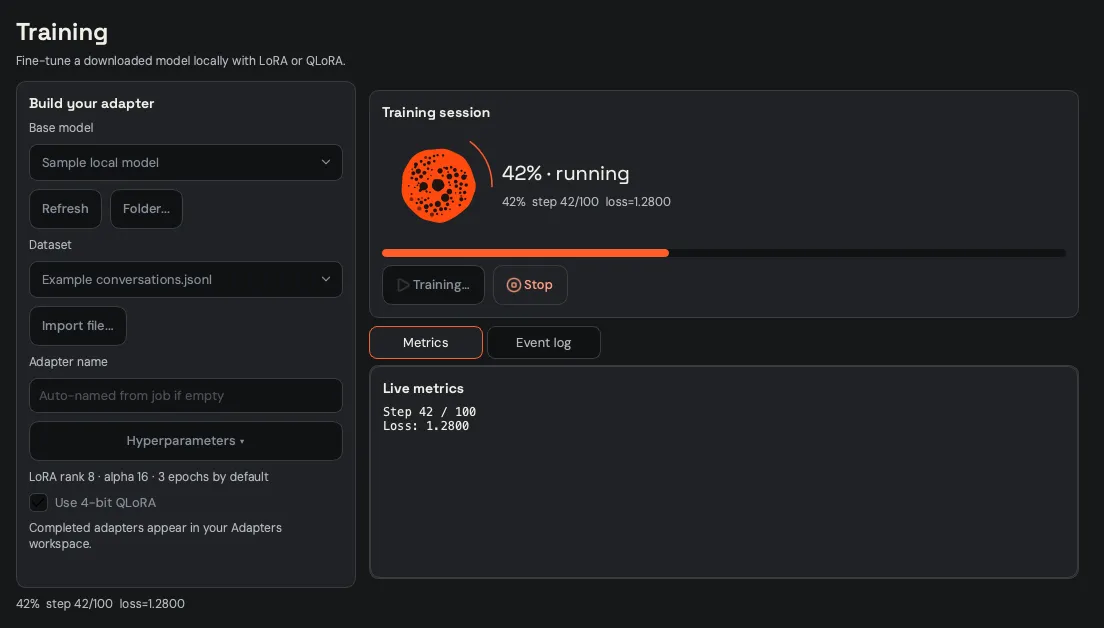
Screenshots come from the app’s UI check, which uses a fixture server with synthetic data.
Highlights
- Built a macOS release pipeline (
build_app.sh,finalize_bundle.py,verify_bundle.py,build_dmg.sh) that produces an ad-hoc-signed arm64 app and DMG from an isolated Python runtime. - Implemented local API authentication (
local_access.py, ADR-0009) with a per-launch secret and Host allow-list, covered bytest_local_access.py. - Reworked model downloads to run in a child process (
pull_worker.py) with byte-level progress, cancellation and cache rollback, because the Hub client could not be cancelled from Python. - Fixed a macOS startup failure by replacing a
QNetworkAccessManagerhealth check with a rawQTcpSocketprobe inbackend_manager.cpp. - Diagnosed clipped icons on Retina displays in
Theme::coloredIconand added 1x/2x/3x checks to--theme-check.
Tech stack
- Languages: C++20, Python (3.12 runtime), Bash
- Frameworks and libraries: Qt 6 (Widgets, Network, Svg), FastAPI, uvicorn, httpx, pydantic, NumPy
- ML: llama.cpp (llama-cpp-python), PyTorch, transformers, PEFT, bitsandbytes, sentence-transformers, huggingface_hub; optional vLLM and Ollama
- Storage: SQLite, local Hugging Face cache
- Build and deployment: CMake, AppImage, DMG (hdiutil), GitHub Actions
- Tooling and testing: unittest (196 backend tests), built-in
--ui-check,--theme-checkand--selftest
/Stack
- C++20
- Qt 6
- CMake
- Python
- FastAPI
- SQLite
- llama.cpp
- PyTorch
- PEFT
- sentence-transformers
- Hugging Face Hub
- GitHub Actions